
🚀 The Complete Guide to SaaS Product Showcase Pages: Convert Visitors Into Trial Users
A SaaS product showcase page is your product's storefront. It must communicate value instantly, build trust rapidly, and convert visitors into trial users. This guide covers the essential elements of a high-converting SaaS showcase.
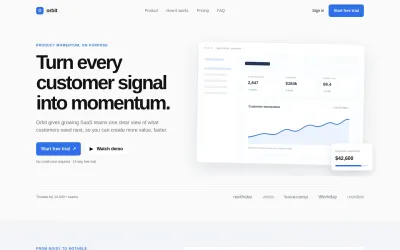
Template Preview
See what your landing page template will look like
What Makes a Great SaaS Product Page?
Unlike generic landing pages, SaaS product pages need to balance feature depth with conversion urgency. Visitors arrive with a specific problem — your page must show, not just tell, how your product solves it.
Key principles:
- Lead with outcome-focused value propositions, not feature lists.
- Show the product in action with screenshots, GIFs, and dashboard previews.
- Build trust through social proof, logos, and specific customer metrics.
- Make the trial signup frictionless — no credit card, instant access.
Essential Sections
1. Hero Section
Your headline should communicate the primary outcome your product delivers. Include dual CTAs: "Start Free Trial" (primary, no credit card) and "Watch Demo" (secondary). Place a product screenshot or dashboard mockup on the right. Add a trust bar: "Trusted by 10,000+ teams" with company logos.
2. Problem & Solution
Use a two-column layout. Left: the 3 pain points your audience faces, with icons. Right: how your product solves each, with mini screenshots. This structure creates an emotional connection before diving into features.
3. Feature Showcase
Display 4 key features in a 2×2 grid. Each card: icon, feature name, 2-sentence description, and a "See it in action" link. Keep it scannable — visitors should understand your product in 10 seconds.
4. How It Works
A 3-step flow: Connect → Configure → Launch. Each step has an icon, title, and one sentence. This section addresses the "is this hard to set up?" objection.
5. Social Proof
3 testimonial cards with customer photo, name, role, company, and a specific metric (e.g., "Reduced churn by 34%"). Include "Read case study" links for deeper engagement.
6. Pricing
3 tiers (Starter/Pro/Enterprise) in a pricing table. Highlight the middle tier as "Most Popular". Include an annual/monthly toggle. Make pricing transparent — hidden pricing kills trust.
7. FAQ
6 common questions in an accordion: integration, security, data export, team sizes, cancellation, support. Address objections before they block signup.
8. Final CTA
Full-width band: "Start your free trial today" + email input + CTA. Reiterate: "No credit card required · 14-day free trial · Cancel anytime."
Conversion Optimization Tips
- Reduce friction: Single email field for trial signup. Remove unnecessary form fields.
- Use specific numbers: "10,000+ teams" beats "Many teams". "34% churn reduction" beats "Better retention".
- Remove navigation: On dedicated product pages, eliminate header/footer links that distract from the conversion goal.
Getting Started
Start with this SaaS product showcase template, customize it with your product details, and launch a conversion-optimized page in minutes.
Frequently Asked Questions
Ready to Showcase Your SaaS Product?
Start with this SaaS product showcase template and drive more free trial signups.