💻 The Complete Guide to Tech & Developer Blog Templates: Building a Portfolio That Gets You Hired
A tech and developer blog is more than a writing outlet — it's your portfolio, your authority builder, and often the reason recruiters reach out. This guide walks through creating a developer blog that showcases your expertise and attracts opportunities.
Template Preview
See what your landing page template will look like
Why Every Developer Should Have a Blog
- Demonstrate expertise: Writing about technical topics proves you understand them deeply.
- Build your personal brand: A well-maintained dev blog is a powerful career asset.
- Give back to the community: Share solutions to problems you've solved — it helps the next developer.
- Create passive career opportunities: Recruiters and hiring managers find you through your writing.
Essential Sections
1. Hero Section
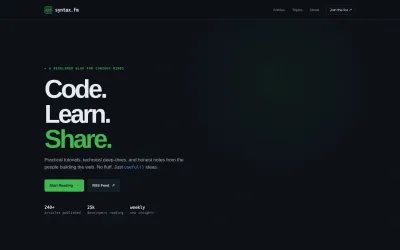
Lead with a bold statement like "Code. Learn. Share." Set the tone with a dark background and subtle code grid pattern. Include dual CTAs: "Start Reading" and "RSS Feed" for power readers.
2. Featured Tutorial
Highlight your best work with a large featured tutorial card. Include a code snippet preview, difficulty badge (Beginner/Intermediate/Advanced), title, read time, and engagement metrics.
3. Latest Articles in List View
Use a list layout (not grid) for developer content — it's more scannable. Each item: thumbnail left, title, 2-line excerpt, tags (React, Python, DevOps), date, and read time.
4. Topics Navigation
A pill bar with categories: Frontend, Backend, DevOps, AI/ML, Mobile, Career. Clicking filters articles for focused browsing.
5. Code Snippet Showcase
Show off your blog's code formatting with a highlighted code block section. Support multiple languages with proper syntax highlighting. This section doubles as a "formatting demo" for potential contributors.
6. Newsletter
"Get the best dev tutorials weekly" + email input. Show subscriber count for social proof ("Join 25,000+ developers").
Design Essentials for Developer Blogs
- Monospace for code: Use JetBrains Mono or Fira Code for all code blocks.
- Dark theme default: GitHub-dark-inspired (#0d1117 background) with green/blue accents.
- Clean, no-nonsense typography: Inter for body text. No decorative fonts.
- Fast loading: Developers have zero patience for slow pages. Optimize everything.
Measuring Success
| Metric | Goal |
|---|---|
| Newsletter Subscribers | Steady monthly growth |
| Article Shares | 50+ per popular article |
| GitHub Stars (if open source) | Organic growth |
| Inbound Recruiter Messages | Quality over quantity |
Getting Started
Start with this developer blog template, customize it with your stack and topics, and publish your first technical deep-dive today — no coding required for the blog setup itself.
Frequently Asked Questions
Ready to Share Your Tech Knowledge?
Start with this developer blog template and publish your first technical article in minutes.